
> techfourlife.com/network-design/

Network Security
for Small Businesses

Your router is the front door to your network. We replace the basic box from your internet provider with a UniFi gateway, then keep it updated.

What a UniFi gateway does

  • Blocks known threats
  • Keeps devices in separate rooms
  • Blocks risky sites and apps
  • Safe access when you are away

Tech 4 Life designs and secures business networks in Carefree, Cave Creek and North Scottsdale, built around a UniFi gateway instead of the basic router from your internet provider. We set up firewall protection, separate networks for your devices and safe remote access, then keep everything updated. Equipment is quoted item by item, and installation is $160 per person-hour.

  • Gateway
    UniFi, commercial grade
  • Since 2004
    Local shop in Carefree
  • Pricing
    Itemized quote first

Why We Recommend a UniFi Gateway

Your internet router is the front door to your network. A UniFi gateway is a much stronger front door than the basic box from your internet provider. Here is what it does, in plain English.
01

It watches for intruders and stops them

  • Think of it as a security guard checking all traffic in and out.
  • Known bad traffic (hackers, malware, scams) is blocked automatically.
  • Its threat list stays up to date, so it recognizes new dangers.
02

It keeps your devices in separate rooms

  • Computers and phones go in one room.
  • Cameras, printers, TVs and other smart devices go in another.
  • Guests and visitors get their own Wi-Fi room.

Why it matters: Smart devices are often the weakest link. If one is hacked, the intruder cannot reach your computers or sensitive files.

03

It can block apps and websites you do not want

  • Block specific sites or apps for everyone, or just for certain devices.
  • Useful for keeping people off risky sites and limiting distractions.
04

Safe access when you are away

  • Need to reach your cameras or files from somewhere else?
  • UniFi connects you through a private, secure tunnel (called a VPN).
  • Nothing gets left open to the internet, where strangers could find it.
05

One simple dashboard, and we can watch it for you

  • Everything on your network shows up in one place.
  • Tech 4 Life can spot problems early and keep things updated, often without an on-site visit.

The bottom line

A UniFi gateway gives you strong, professional-grade protection without the complexity. You get the safety. We handle the setup and upkeep.

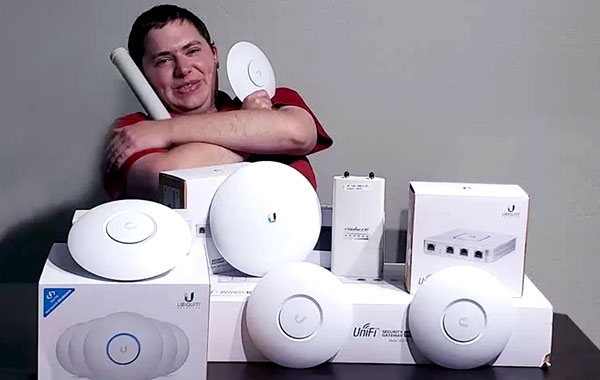
Alex Deuel, Tech 4 Life technician, with UniFi Wi-Fi access points

What We Set Up for Your Office

We design the whole network, not just the gateway. Every piece is commercial grade, and every item is on your quote before we start.

  • UniFi gateway with firewall and threat blocking
  • Separate networks for staff, smart devices and guests
  • Business Wi-Fi access points placed for coverage
  • Network switches and clean cabling
  • Secure VPN for remote access
  • Automatic security updates

Why a Secure Network Matters

Small businesses are targeted because attackers expect weaker defenses.

  • Customer data stays private
    Financial and customer records stay protected.
  • Less downtime
    A cyber incident can stop work for days.
  • Safe remote work
    Staff connect through a secure VPN.
  • Your reputation stays strong
    No breach to explain to your customers.

Network Design Prices

Every network gets an itemized quote before any work begins. Here is how it is built.

  • Hardware
    Gateway, switches, access points and cabling listed at their quoted prices
  • Installation labor
    $160 per person-hour, estimated on the high side
  • Trip charge
    $25 per trip
  • Payment
    Deposit equal to the hardware schedules your install. Labor is due at completion.

HOW WE PRICE IT

Installation Labor

$160

per person-hour

Itemized quote before you commit

  • Every item and price listed on your quote
  • Labor estimated on the high side
  • Testing and training included
  • Cash, check, Zelle or credit card

Network Security Questions

Why use a UniFi gateway instead of my provider’s router?

The router from your internet provider is a basic front door. A UniFi gateway checks all traffic in and out, blocks known threats automatically and keeps its threat list up to date. It also lets us separate your devices and set up safe remote access.

What does keeping devices in separate rooms do?

We put computers and phones on one network, smart devices like cameras, printers and TVs on another, and guests on their own Wi-Fi. Smart devices are often the weakest link. If one is hacked, the intruder cannot reach your computers or sensitive files.

Can I reach my cameras and files when I am away?

Yes. UniFi connects you through a private, secure tunnel called a VPN. Nothing is left open to the internet, where strangers could find it.

Can Tech 4 Life watch my network for me?

Yes. Everything on your network shows up in one UniFi dashboard. We can spot problems early and keep things updated, often without an on-site visit. Ask about ongoing monitoring when we quote your network.

How much does network design cost?

Every network gets an itemized quote before work begins. Hardware is listed at its quoted price, installation is $160 per person-hour, and each trip is $25. A deposit equal to the hardware schedules your install, and labor is due at completion.

Do you set up home networks too?

Yes. We bring the same careful planning to homes through our internet and Wi-Fi service, including equipment placement and troubleshooting. Business networks get the full security design on this page.

What areas do you serve?

Tech 4 Life designs and installs business networks in Carefree, Cave Creek, Scottsdale and the metro Phoenix area. We have protected small businesses since 2004 from our office at 748 Easy Street #12 in Carefree.

Let’s Discuss Your Choices

Tell us about your office and what you want to protect. We will walk you through your options and give you an itemized quote.

748 Easy Street #12, Carefree, AZ 85377
Mon to Fri, 9:00 am to 5:30 pm

Send Us a Message

enter numbers only